



Price: $189.99 - $6.99
(as of Dec 03, 2025 23:09:12 UTC – Details)
Product description


1 Rapid Trigger – RT
2 Snap Key- SOCD
3 DKS & MT
4 Toggle Key – TGL
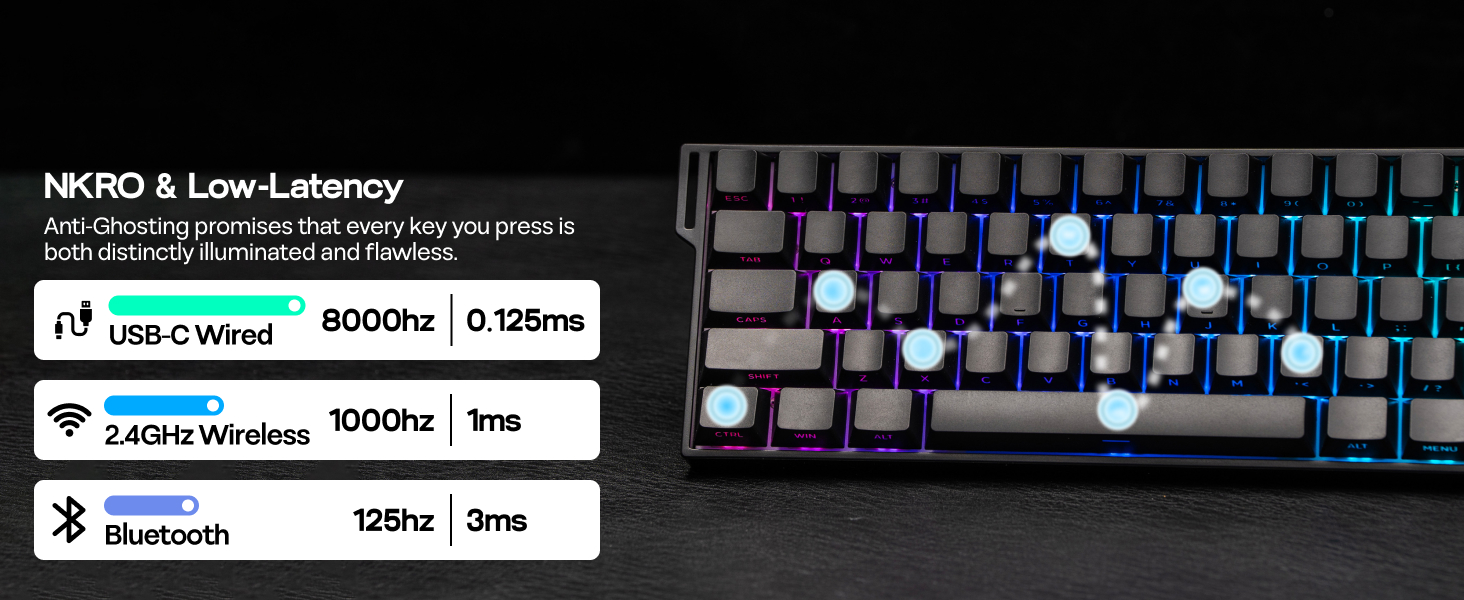
5 8KHz & 0.125ms Latency


1 BT/2.4G/Wired, Win/Mac
2 60% ANSI Layout
3 Ergonomic Keyboard
4 Sound Dampening
5 AULA Web Driver
Dual Wake-Up Mode & Indicator Light & Packing List All-Key or Single-Key Activation Dual Wake-Up Mode
Short press the FN and ESC keys can toggle between 2 wake-up methods. When the ESC key lights Red, the keyboard is in All-Key Wake-Up mode; if it lights Green, it is in Single-Key Wake-Up mode. Note: If pressing the FN and ESC for 3 seconds, the keyboard will be reset. You can flexibly adjust this according to your needs and environmental conditions, effectively enhancing your gaming or typing experience.  Holding the FN key, relevant keys will light up Intuitive Indicator Light
CAPS lights white = Caps LockWIN lights white = Win Lock. Pressing the FN + WIN keys to lock/unlock itA = Android Mode, S = Windows Mode, D = Mac ModeQ/W/E = BT Device 1/2/3, R = 2.4G Code Matching  What will I receive? Packing List
Mini60 HE PRO KeyboardUser Manual & Quick GuideUSB-C Cable, Switch & Keycap PullerDetachable Ribbon, Dust Cover
The video showcases the product in use.The video guides you through product setup.The video compares multiple products.The video shows the product being unpacked. Mini60 HE PRO Black Merchant Video


RGB Backlits Shine Through Gaming Keyboard
1 Vibrant Backlights 2 Side-Printed Keycaps 3 Hot Swappable 4 Magnetic Switches
How can I check the remaining battery level of my keyboard?
Press FN + B to view your battery level (green backlight on keys 1-0 indicates it)
What are the polling rate and latency of this mechanical keyboard?
The polling rate: 8000Hz (USB Wired), 1000Hz (2.4G Wireless), 125Hz (Bluetooth)
The latency: 0.125ms (USB Wired), 1ms (2.4G Wireless), 3ms (Bluetooth)
How to switch the function of 1, 2…0 and F1, F2…F12?
You can convert the function row to number keys by pressing FN and left Ctrl.
(When the left Ctrl’s red LED is on, the keyboard is on the function row)
What is hall effect magnetic switch? Is it the same as mechanical switch?
The Hall effect switches input signals by translating changes in magnetic flux, while mechanical switches require a physical connection of the circuit to input signals.
Is this gaming keyboard compatible with all games? Does it work with consoles?
While connectivity with the console works, compatibility is not guaranteed and may vary depending on specific games or third-party controllers. Advanced features such as RT, SOCD, or DKS are restricted by certain games as cheating.
More Gaming Keyboard with Magnetic Hall Effect Switches
Add to Cart
Add to Cart
Add to Cart
Add to Cart
Add to Cart
Customer Reviews
4.6 out of 5 stars 64
4.4 out of 5 stars 29
4.1 out of 5 stars 147
4.6 out of 5 stars 54
4.6 out of 5 stars 109
Price
$81.99$81.99
$75.99$75.99
$69.99$69.99
$39.99$39.99
$59.99$59.99
Polling & Latency
8K Polling, 0.125ms
8K Polling, 0.125ms
8K Polling, 0.125ms
8K Polling, 0.125ms
8K Polling, 0.125ms
Adjustable Travel
0.01-3.4mm (per 0.01mm)
0.01-3.4mm (per 0.01mm)
0.1-2.0mm (per 0.1mm)
0.01-2.0mm (per 0.01mm)
0.01-2.0mm (per 0.01mm)
Case Material
Plastic
Plastic
Plastic
Aluminum
Plastic
Layout
75% ANSI, QWERTY
65% ANSI, QWERTY
75% ANSI, QWERTY
65% ANSI, QWERTY
65% ANSI, QWERTY
Connectivity
USB-C Wired
USB-C Wired
USB-C Wired
USB-C Wired
USB-C Wired
Backlight
Per-Key RGB
Per-Key RGB
Per-Key RGB
Per-Key RGB
Per-Key RGB
Keycaps Shine-Through?
No
Yes (South-Facing)
No
Yes (South-Facing)
Yes (South-Facing)
Hot-Swappable
Magnetic Switch
Magnetic Switch
Magnetic Switch
Magnetic Switch
Magnetic Switch
OS System
Win/Mac/Android/iOS
Win/Mac/Android/iOS
Win/Mac/Android/iOS
Win/Mac/Android/iOS
Win/Mac/Android/iOS
Software
AULA Web Driver (Chrome)
AULA Web Driver (Chrome)
AJAZZ Driver
AJAZZ Driver
AJAZZ Driver
【Hall Effect Magnetic Switch & 0.01mm RT Sensitivity】Experience next-gen responsiveness with hall effect switches that set the Mini60 HE PRO apart from ordinary keyboards. The Mini60 HE PRO gaming keyboard delivers outstanding versatility suited for fast-paced shooter games as well as thoughtful strategy inputs. The 0.01mm precision allows granular actuation control via driver – adjust trigger points from 0.1mm (lightning-fast FPS games) to 3.4mm (deliberate typing), offering a true hybrid for esports and productivity.
【8K Polling Rate & 128KHz Scanning Rate】Elevate your gaming experience with the Mini60 HE PRO’s 8K polling rate. This advanced feature offers unparalleled responsiveness during intense gaming sessions. Coupled with a remarkable 128KHz scanning rate, this keyboard allows for lightning-fast updates on key presses, translating to smoother gameplay and enhanced control. Whether you’re navigating through complex game scenarios or executing rapid commands, the Mini60 HE PRO guarantees that every input is captured instantly.
【60% Compact Layout】Designed with efficiency in mind, the Mini60 HE PRO keyboard features a compact 60% layout that saves desk space without compromising functionality. This minimalist design strips away unnecessary keys, allowing for a cleaner workspace while providing all essential functions needed for both gaming and productivity. The ergonomic 2-level stands also help maintain comfort during long hours of usage, whether you’re engaging in extended gaming marathons or tackling demanding projects.
【Tri-Mode Wireless & Cross-Platform Mastery】The Mini60 HE PRO wireless keyboard features tri-mode connections: Bluetooth, 2.4GHz wireless, and USB-C wired. Effortlessly switch between devices—ideal for gaming on PC, working on Mac, or using a tablet. The Bluetooth connection keeps your setup tidy, while the low-latency 2.4GHz option meets demands for speed and reliability. Plus, the robust 4000mAh battery offers extended wireless usage, reducing the frequency of recharges and helping you stay focused.
【Stunning RGB Backlits & Shine Through Keycaps】Light up your gaming setup with the eye-catching RGB backlighting of the Mini60 HE PRO custom keyboard. Customize your keyboard with a spectrum of vibrant colors and dynamic lighting effects to create an immersive atmosphere. The side-printed shine-through keycaps enhance the visual appeal, allowing the RGB lights to illuminate beautifully even in low-light conditions. Choose from multiple lighting modes and adjust brightness levels to suit your preferences.
【Programmable Web Driver】Unlock the full potential of the Mini60 HE PRO with its programmable web driver, which allows users to customize key functions and macros according to their personal preferences. By implementing Mod Tap or Dynamic Keystroke, you can assign several functions to one key, allowing for command activation based on taps, holds, or varying keystroke distances while maintaining control of movement keys. This intuitive software makes it easy to tailor the keyboard for different games or applications.


Reviews
Clear filtersThere are no reviews yet.